Dungeon Souls Save Editing, Part 3

· One min read

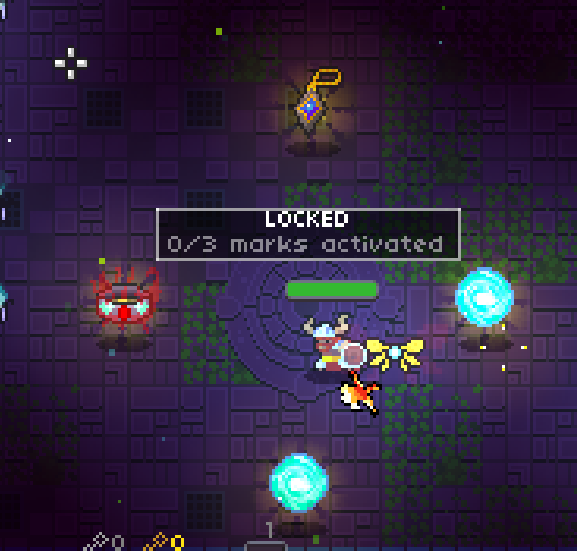
Continuing with the variety of files related to the Arcane Forge, we explored arc_frg_eqp.ds.

This is a list of items equipped to you char from the Arcane forge.

The file is 8 lines long. The odd lines can be either 0, 1, or 2. This maps to the equipped items Ninby's Grace, Herberk's Pendant, Murderer's Ring respectively.

Spawning with all items

I believe the even number is the item this turns into when you put it back in the inventory.

Dungeon Souls Save Edit, Part 2

· 3 min read

After hacking away at the character safe information, I wanted to take a crack at understanding the weapons system.

In ~/Libaray/Application Support/com.yoyogames.macyoyorunner there’s a grip of files realted to the Arcane Forge.

In order to give ourselves items we want to look at arc_frg_itm.ds.

This is a list of numbers which corresponds to various weapons. The breakdown is:

NumberItem
0Barbarian’s Axe (Barbarian’s default)
1Viking’s Axe (Viking’s() default)
2Archer’s Bow (Archer’s default)
3Viper (Ranger’s() defualt)
4Thief’s Knife (Thief’s default)
5Rouge’s Knife (Rouge’s() default)
6Warrior’s Sword (Warrior’s default)
7Knight’s Sword (Knight’s() default)
8Wizard’s Staff (Wizard’s default)
9Archmage’s Staff (Archmage’s() default)
10Cleric’s Staff (Cleric’s default)
11Paladin’s Staff (Paladin’s() default)
12Necromancer’s Scepter (Necromancer’s default)
13Raven’s Staff (Raven’s() default)
14Nightblade’s Scepter (Nightblade’s default)
15Destroyer’s Hammer (Destroyer’s() default)
16Brawler’s Mace (Brawler’s default)
17Naginata (Duelist’s() default)
18Engineer’s Wrench (Engineer’s default)
19Mechanic’s Wrench (Mechanic’s() default)
20Fire Sword
21Fire Staff
22Fire Dagger
23Fire Axe
24Fire Scepter
25Fire Bow
26Ice Sword
27Ice Dagger
28Ice Staff
29Ice Scepter
30Ice Bow
31Ice Axe
32Poltergeist Bow
33Poltergeist Dagger
34Poltergeist Staff
35Ninby’s Grace
36Maps back to 15
37Murderer’s Ring

When supplying numbers outside this range you can crash the game. I could not get consistent behavior on the crash. One time it was an index out of range, another time it was indexing an object that wasn’t indexible.

When it handles bad values correctly it defaults them to the Barbarian’s Axe.

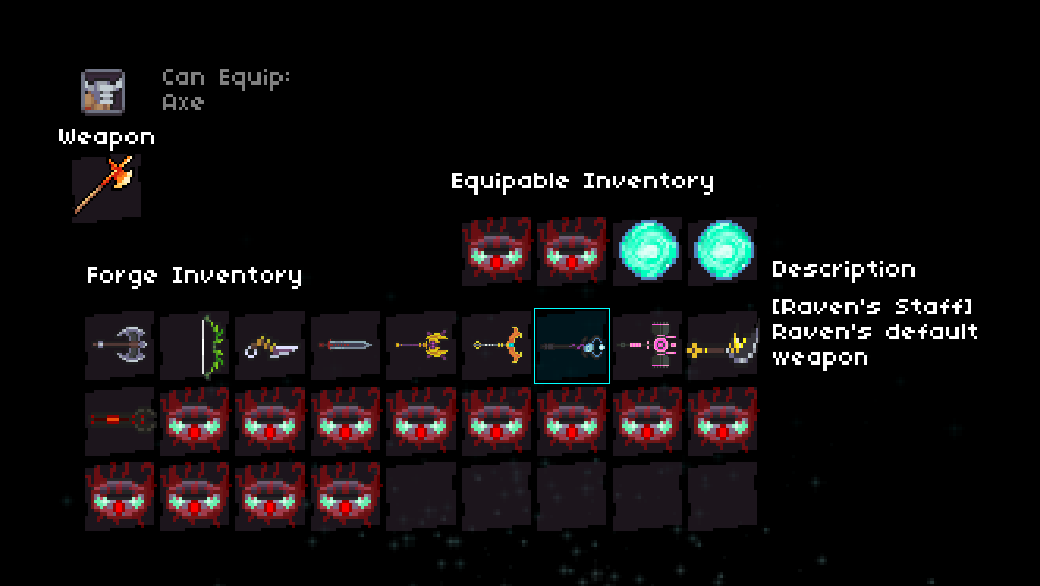
We notice there’s some interesting characters mentioned that aren’t in the game. There’s the Viking, Viper, Rogue, Knight, Archmage, Paladin, Raven, Destroyer, Duelist, and Mechanic. Their default weapons can be seen below with a bunch of Murderer’s Rings.

Hidden Weapons

From what I can tell it looks like they will be an upgraded version of the base version of each character.

Dungeon Souls Save Editing

· 2 min read

I’ve been playing a game called Dungeon Souls. It’s a rouge like that difficult at first, but then becomes extremely fun once you get the hang of it.

After playing for a bit, I started messing around with Bit-Slicer to give myself massive HP regen and a bunch of damage, I wanted to do something a bit more fun. I wanted to edit my save.

A quick Google search for the save location came up empty. I needed to watch which files the process interacted with during so I could find them.

To do this I ran sudo fs_usage | grep Mac | less. I then launched and exited the game which generated a nice list of file system usage. While browsing through the results a file called dungeonsouls.ds caught my eye.

Found You

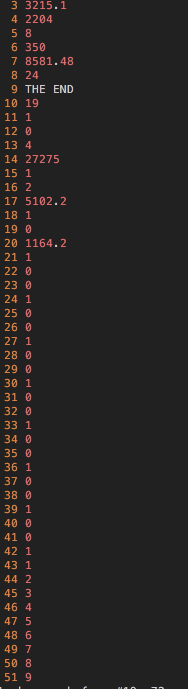
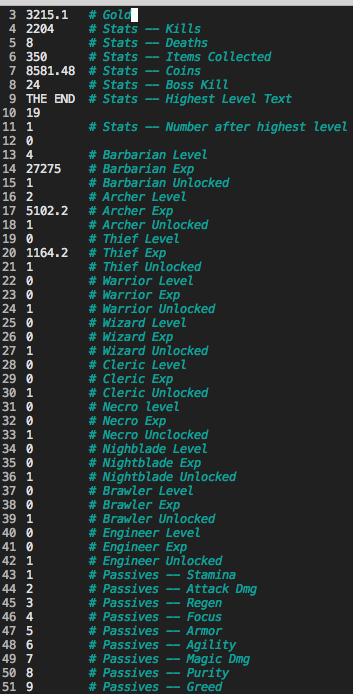
Upon opening the file, you are greeted with 51 lines of information. It was time to trace these values back to the game.

There's more to the file

Time to boot up the game and see if we can find anything that looks like these values.

Barbarian

Oh hey look at that, 4 stars and 27275 experience. I think we found our Barbarian!

Passives And Gold

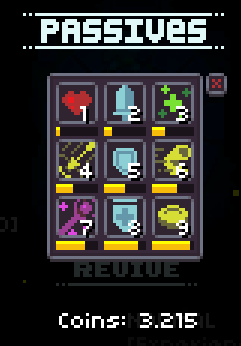
Woot passives and gold are found.

Game States

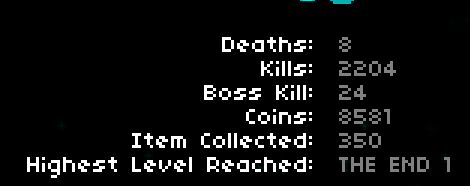
And our stats…

After poking around, the save file breaks down as follows:

Woot

Unfortunately, I couldn’t figure out what lines 1, 2, 10, and 12 are for.

Passives are capped at 10 and setting them past that doesn’t work.

Based on previous behaviors I saw during my time with Bit-Slicer, setting the experience past the current amount needed for the current level results in one level increase and the experience being reset to 0.

The unlock toggle is 0 for locked 1 for unlocked. It does not work for the Barbarian, Thief, and Archer as they are the default chars.

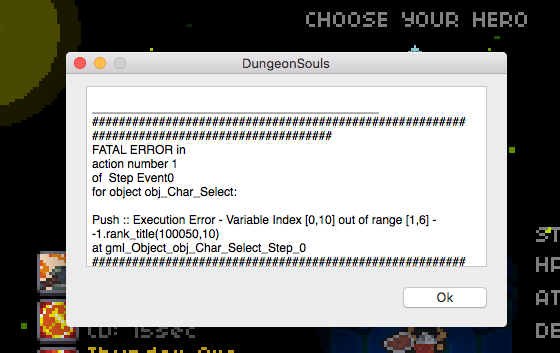
Do not set the class level outside 0 - 5. You will cause an index out of bounds error and crash the game.

Whoops

If stats require a numeric value, but receive a string, they are set to 0 in the game.

Just having some funsies with highest level text:

Over 9000!

Markov Chains with Erlang

· 5 min read

My previous posts about getting started with epgsql helped me get familiar so I could store my Makov chain data in a database to help Markov-lang learn how to talk.

Today we’re going to discuss how we generate the Markov chain data that will go into that database. I’m going to forgo the OTP portion of this application. Though the full version can be found on my github.

For those unfamiliar, Markov chains describe how likely you are to transition from one state to the next. Read about them here and here. Or you can just Google it.

I wanted to model text as a chain. This chain represents the transition from a prefix of two words to a one word suffix.

this is a string, this is a string, this is a ending

start of sentence -> this
start of sentence this -> is
this is -> a
is a -> string,
a string, -> this
string, this -> is
this is -> a
is a -> string,
a string, -> this
string, this -> is
this is -> a
is a -> ending
a ending -> end of sentence

To start this we will represent start of sentence as two spaces [" ", " "]. We will tokenize the string. Then we will represent end of sentence as a special string ["<<< undefined>>>"]. (Please note the space in <<< undefined>>> is there because of the markdown).

The string:

"This is a string, this is a string, this is a ending"

Turns into:

[" ", " ", "This", "is", "a", "string", " this", "is", "a", "string", " this", "is", "a", "ending", "<<< undefined>>>"]

We will write a splitString function to take our incoming string, remove any unprintable chars, and return the list of tokens.

%% markov.erl

We pad it with two blank space to represent the start of a sentence. Then we append "<<< undefined>>>" so that we know when we’ve reached the end of a sentence.

Now that we have a list of the words, we need to turn this into the chains we described above. In order to represent these I created a chain record:

%% records.hrl

Now lets turn our list of tokens into a table of chains.

%% markov.erl

We will discuss the call to reduceTable shortly. genTable/1 takes in a list of tokens and then calls itself with the list, the tail of the list and the tail of the tail of the list. We keep accumulating chains until we run out of suffixes.

When we reach tl(L3) == [] the accumulator acc looks like:

1 [  
2 {chain, " ", "this"},
3 {chain, " this", "is"},
4 {chain, "this is", "a"},
5 {chain, "is a", "string,"},
6 {chain, "a string,", "this"},
7 {chain, "string, this", "is"},
8 {chain, "this is", "a"},
9 {chain, "is a", "string,"},
10 {chain, "a string,", "this"},
11 {chain, "string, this", "is"},
12 {chain, "this is", "a"},
13 {chain, "is a", "ending"},
14 {chain, "a ending", "<<<undefined>>>"}
15 ]

You’ll notice that some chains such as lines 4 and 8 have the same prefix and suffix. Also, you’ll notice chains such as lines 5, 9, and 13 all share the same prefix, but line 13 has a different suffix. In order to weight chains properly I came up with 2 more records.

%% records.hrl  
-record(reducedChain, {prefix="", suffixes=[]}).
-record(suffix, {word="", count=0}).

The reducedChain record represents a prefix and a list of suffixes. The suffixes in the list are of the suffix record type which keeps track of the suffix and how many times it has appeared after the prefix for the reducedChain.

The call to reduceTable, told you we would get to this, takes the list of chains and turns it into a list of reducedChains.

%% markov.erl  
reduceTable(Table) ->
reduceTable(Table, []).
reduceTable([], Acc) ->
Acc;
reduceTable(Table, Acc) ->
Chain = hd(Table),
Prefix = Chain#chain.prefix,
ChainsSamePrefix = gatherChainsWithPrefix(Prefix, Table),
Suffixes = genSuffixes(ChainsSamePrefix),
reduceTable(Table -- ChainsSamePrefix, Acc ++ [factories:reducedChainFactory(Prefix, Suffixes)]).

Our first step is to get all the chains with the same prefix:

hasPrefix(Prefix, #chain{prefix=Prefix, suffix=_}) ->  
true;
hasPrefix(_,_) ->
false.
gatherChainsWithPrefix(Prefix, Table) ->
lists:filter(fun(Chain) ->
hasPrefix(Prefix, Chain)
end, Table).

If we gather the chains for the prefix "is a" we would get the following output:

1 [  
2 {chain, "is a", "string,"},
3 {chain, "is a", "string,"},
4 {chain, "is a", "ending"}
5 ]

The next step is to create the suffixes for our reducedChain.

hasSuffix(Suffix, #chain{prefix=_, suffix=Suffix}) ->  
true;
hasSuffix(_,_) ->
false.

gatherChainsWithSuffix(Suffix, Table) ->
lists:filter(fun(Chain) ->
hasSuffix(Suffix, Chain)
end, Table).

countSameSuffix(Suffix, Chains) ->
lists:foldl(fun(Chain, NumSame) ->
case hasSuffix(Suffix, Chain) of
true -> NumSame + 1;
false -> NumSame
end
end, 0, Chains).

genSuffixes([], Acc) ->
Acc;
genSuffixes(Chains, Acc) ->
Chain = hd(Chains),
Suffix = Chain#chain.suffix,
SameSuffixes = gatherChainsWithSuffix(Suffix, Chains),
NumSameSuffix = countSameSuffix(Suffix, Chains),
genSuffixes(Chains -- SameSuffixes, Acc ++ [factories:suffixFactory(Suffix, NumSameSuffix)]).

We would get the following list of suffixes:

[  
{suffix, "string,", 2},
{siffix, "ending", 1}
]

Now we have everything we need to create a reducedChain. We do this for all items and we end up with the following reducedTable:

[  
{reducedChain, " ", [{suffix, "this", 1}],
{reducedChain, " this", [{suffix, "is", 1}],
...
{reducedChain, "is a", [{suffix, "string,", 2}, {suffix, "ending", 1}],
...
{reducedChain, "this is", [{suffix, "a", 3}],
...
]

Now we have generated out weighted chains and can use these to generate sentences. I will go over this in my next blog post when I cover how we attach the database.

A version of Markov-lang that can generate sentences without the database exists at this commit. Just feed the output of genTable into genSentence

Postgres + Erlang on OSX Part 2

· 2 min read

In the last post we got epgsql running inside our Erlang REPL.  Now we are going to start using epgsql.

Start your Postgres server and open up your REPL.  Make sure epgsql is loaded by running:

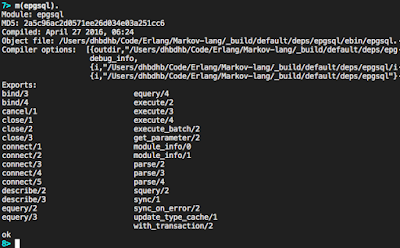
m(epgsql).

If it's there you will see the module's information:

epgsql module info

To connect to our database we run:

{ok, Connection} = epgsql:connect("<hostname>", "<username>", "<password>", [{database, "<dbname>"}]).

This will return a connection that we can then use to interact with the database.

To create a table by running the following Simple Query:

{ok, [], []} = epgsql:squery(Connection, "CREATE TABLE foo (id SERIAL PRIMARY KEY, prefix TEXT, suffix TEXT);").

Now to insert data into our database we run:

{ok, 1} = epgsql:squery(Connection, "INSERT INTO foo (prefix, suffix) VALUES ('foo', 'bar');").

This returns {ok, N}, where N is the number of rows inserted.  Lets go head and add two more items into out database:

{ok, 2} = epgsql:squery(Connection, "INSERT INTO foo  (prefix, suffix) VALUES ('one', 'two'), ('three', 'four');").

In order to query our database we can use a simple query

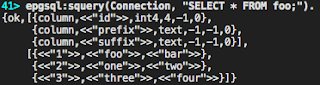
{ok, Cols, Rows} = epgsql:squery(Connection, "SELECT * FROM foo;").

This will return all the data in the row as binary data:

squery results

In order to get data returned typed correctly we need to use an extended query:

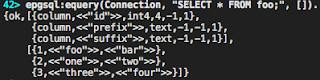
{ok, Cols, Rows} = epgsql:equery(Connection, "SELECT * FROM foo;", []).

As you can see, the id column is an integer now, the strings are still binary.  However, if we had booleans they would be returned as boolean values, etc.

equery results

That's how you can connect to and get data in and out of a Postgres database using Erlang.

Now lets close the connection by running:

epgsql:close(Connection).

Postgres + Erlang on OS X Part 1

· One min read

I've been trying to get epgsql so I can build out the database for Markov-lang.  Getting this running took some time.

First we needed to install rebar3.  You do this by running:

brew install homebrew/versions/rebar3

Once rebar3 is installed, you have to configure it to work with hex.pm.  You do this by running the following:

mkdir -p ~/.config/rebar3 

Then create the following file ~/.config/rebar3/rebar.config with the following contents:

 {plugins, [rebar3_hex]}.

(EDIT: According to Reddit user mononcqc this is only necessary if you want to publish packages not fetch them)

Then run:

rebar3 update

Now, in the directory for you project that will use postgres, create a file /Path/To/App/rebar.config with the following content:

{deps, [epgsql]}.

Now you can access epgsql by running:

rebar3 shell

It should compoile epgsql. In the REPL started by the previous command you can run:

m(epgsql).

To access this from within Emacs, start the Erlang REPL in Emacs with the following flag:

-pz _build/default/deps/epgsql/ebin 

Part 2 can be found here.

First Haskell Program

· One min read

For a while I've wanted to start writing in a functional language. However, I never really knew how to start or what to do. I read most of the way through Learn You A Haskell. Then I read about a functional language called Erlang which looked really cool. I read a bit of Learn You Some Erlang. Things made a bit more sense, but I still didn't know what to do.

Yesterday, I finally wrote my first program in Haskell. It's called Python Class Creator. Python Class Creator is a pretty simple program. It takes in two strings and then dumps out a basic python class implementation. Check it out on my Github page.

Autobooted to FreeBSD's loader

· 2 min read

The GPS addon I use with for my RaspberryPi starts sending information to the RPi through the GPIO the second it tuns on. The RPi reads this as input to the serial console and this interrupts UBoot's autoboot process.

In order to fix this you had to use set autoboot to only stop when a certain string is typed in during the autoboot countdown. The following changes are made to UBoot/include/configs/rpi.h.

First we enable autoboot by adding #define CONFIG_BOOT_DELAY N, where N is a number of seconds. Then we enable the advanced autoboot controls by adding #define CONFIG_AUTOBOOT_KEYED.

Next we need to print out a prompt to the user to let them know that we are waiting for autoboot. To do this we define #define CONFIG_AUTOBOOT_PROMPT str,bootdelay, where "str" is a string that takes the format of a call to printf() and allows variable input. I set my str to "autoboot in %d seconds\ntype 'stop' to get to UBoot\n",bootdelay.

Finally we define the string that must be typed in after the prompt appears in order to get into UBoot. This is achieved by adding #define CONFIG_AUTOBOOT_STOP_STR str, where str is the string that needs to be typed in.

Now when I turn on my RaspberryPi I still have serial access if I need it. Now I have to configure loader.conf to not listen to the serial port.

Build Process Automated

· One min read

I finished automating the build process for Crochet Using the newest U-Boot.

Clone my Crochet Fork and then inside that clone my UBoot Fork. Set up your Crochet config file and run sh crochet.sh -c <config_file> and enjoy a bootable FreeBSD image for your RaspberryPi.

Please read <u-boot-top>/doc/README.clang since is a little bit of set up to do. Don't worry about the gmake stuff that's already taken care of =)

Finally Booted!

· 2 min read

I finally got Crochet-FreeBSD to build an image that can boot the Raspberry Pi using the newest version of UBoot. Specifically U-Boot-2015.01.tar.gz

There are three define statements that need to get added to the configuration file. There are also three files that need patches.

The define statements get added to u-boot/include/configs/rpi.h. They are #define CONFIG_API, #define CONFIG_CMD_ELF, and #define CONFIG_SYS_MMC_MAX_DEVICE 1.

The first patch includes libc in the make process. To do this change line 668 in u-boot/Makefile from PLATFORM_LIBS += $(PLATFORM_LIBGCC) to PLATFORM_LIBS += $(PLATFORM_LIBGCC) -lc.

The second patch is to change line 40 in u-boot/examples/api/Makefile from cmd_link_demo = $(LD) --gc-sections -Ttext $(LOAD_ADDR) -o $@ $(filter-out $(PHONY), $^) $(PLATFORM_LIBS) to cmd_link_demo = $(LD) --gc-sections -static -Ttext $(LOAD_ADDR) -o $@ $(filter-out $(PHONY), $^) $(PLATFORM_LIBS).

These two patches and the define statements are described in Crochet's NewBoardExample's README.

The last patch is to disable high speed sdhci support. To do this change line 494 in u-boot/drivers/mmc/sdhci.c from host->cfg.host_caps = MMC_MODE_HS | MMC_MODE_HS_52MHz | MMC_MODE_4BIT; to host->cfg.host_caps = MMC_MODE_4BIT;.

This last patch is bundled with Crochet, but is Raspberry Pi specific.

In addition to these changes, there are changes to Crochet itself.

Line 144 in crochet-freebsd/lib/uboot.sh needs to change from if gmake SED=gsed HOSTCC=cc CROSS_COMPILE=${FREEBSD_XDEV_PREFIX} $2 > $1/_.uboot.configure.log 2>&1; then to if gmake CC="clang -target arm-freebsd-eabi --sysroot /usr/armv6-freebsd -no-integrated-as -mllvm -arm-use-movt=0" $2 > $1/_.uboot.configure.log 2>&1; then.

In that same file line 168 changes from if gmake SED=gsed HOSTCC=cc CROSS_COMPILE=${FREEBSD_XDEV_PREFIX} > $1/_.uboot.build.log 2>&1; then to if gmake CC="clang -target arm-freebsd-eabi --sysroot /usr/armv6-freebsd -no-integrated-as -mllvm -arm-use-movt=0" -j8 > $1/_.uboot.build.log 2>&1; then.

These changes are required by UBoot when building with clang. There is a bit of configuring to be done described in u-boot/docs/README.clang.